
CSS: Tables: border-collapse: separate
The CSS2 border-collapse property allows you to quickly create formatted tables using plain HTML markup.
Here is a sample CSS snippet that contains all you need to format tables with any range of colours, borders and other effects:
table {
  border-collapse: separate;
  border: 1px solid #666;
  background-color: #ccf;
}
th {
  text-align: left;
}
td {
  border: 1px solid #666;
  background-color: #ffc;
}
Essentially, setting the border-collapse property to separate allows borders to be applied to table cells in ways that aren't possible using CSS1.
The styles above are applied to two tables below that are marked up using nothing fancier than TH (for headings) and TD (for content). The cellpadding and cellspacing values are defined in the HTML, but could also be set using CSS.
| Heading 1 | Heading 2 | Heading 3 |
|---|---|---|
| content | content | content |
| content | content | content |
| content | content | content |
| Heading 1 | content | content | content |
|---|---|---|---|
| Heading 2 | content | content | content |
| Heading 3 | content | content | content |
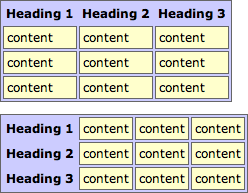
This kind of layout is not possible using the standard TABLE model.
Combining border-collapse with other properties
This last example combines the 'separated' table model with the experimental border-radius property:
| Heading 1 | Heading 2 | Heading 3 |
|---|---|---|
| content | content | content |
| content | content | content |
| content | content | content |
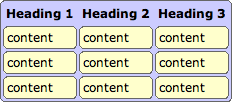
As explained on the border-radius page this will work in the Mozilla browsers (Firefox, Netscape et al) and not in Internet Explorer.
References
- W3C: Tables
Related Articles - Tables
- CSS border-collapse: separate
- CSS border-collapse: collapse
Dave 1 October, 2014
Your examples that show "How it should appear" do not look any different.
All modern browsers now support these styles.