
JavaScript: Form Validation: Date and Time
When capturing information for insertion into a database, or use in other processing, it's important to control what the user can enter. Otherwise you can end up with values in the database that have no relation to reality.
Checking for valid format
In this example, the date fields will only accept input that matches the pattern 'dd/mm/yyyy' (this could just as easily be changed to 'yyyy-mm-dd' or 'mm/dd/yyyy'). The time field will allow input starting with 'hh:mm' following by an optional 'am' or 'pm'. The fields can also be empty.
The code behind the form is as follows:
<script>

  function checkForm(form)
  {
    // regular expression to match required date format
    re = /^\d{1,2}\/\d{1,2}\/\d{4}$/;

    if(form.startdate.value != '' && !form.startdate.value.match(re)) {
      alert("Invalid date format: " + form.startdate.value);
      form.startdate.focus();
      return false;
    }

    // regular expression to match required time format
    re = /^\d{1,2}:\d{2}([ap]m)?$/;

    if(form.starttime.value != '' && !form.starttime.value.match(re)) {
      alert("Invalid time format: " + form.starttime.value);
      form.starttime.focus();
      return false;
    }

    alert("All input fields have been validated!");
    return true;
  }

</script>
For each field in the form (first the dates, then the time field), a check is made as to whether the input is blank. If not, the input is compared to the regular expression. The expressions use a pre-defined class \d which represents any numeric character (0-9).
If you wanted to be really finicky the regular expression to match a date could also be written as:
re = /^[0-3]?[0-9]\/[01]?[0-9]\/[12][90][0-9][0-9]$/
If the input doesn't match the regular expression then an error message is presented, the routine stops the form from submitting by returning a false value and the focus is moved to the relevant form field.
If all tests are passed, then a value of true is returned which enables the form to be submitted.
This routine DOES NOT check that the date or time input values are valid, just that they match the required format (d/m/y and h:m). Read further for more comprehensive checking.
Checking that input values are within bounds
Once you're in control of the input format, it's a lot easier to check that the values are actually valid. The function has been improved now so that the day, month and year values are checked to ensure that they're in the right ball-bark (ie. 1-31 for the day and 1-12 for the month). Also the year must be between 1902 and the current year.
The year limitation would be used if you were asking for a date of birth or date of some recent event. If you're setting up a calendar of future events you would check that the year is the current year or greater.
The code behind the form now is as follows:
<script>

  function checkForm(form)
  {
    // regular expression to match required date format
    re = /^(\d{1,2})\/(\d{1,2})\/(\d{4})$/;

    if(form.startdate.value != '') {
      if(regs = form.startdate.value.match(re)) {
        // day value between 1 and 31
        if(regs[1] < 1 || regs[1] > 31) {
          alert("Invalid value for day: " + regs[1]);
          form.startdate.focus();
          return false;
        }
        // month value between 1 and 12
        if(regs[2] < 1 || regs[2] > 12) {
          alert("Invalid value for month: " + regs[2]);
          form.startdate.focus();
          return false;
        }
        // year value between 1902 and 2026
        if(regs[3] < 1902 || regs[3] > (new Date()).getFullYear()) {
          alert("Invalid value for year: " + regs[3] + " - must be between 1902 and " + (new Date()).getFullYear());
          form.startdate.focus();
          return false;
        }
      } else {
        alert("Invalid date format: " + form.startdate.value);
        form.startdate.focus();
        return false;
      }
    }

    // regular expression to match required time format
    re = /^(\d{1,2}):(\d{2})([ap]m)?$/;

    if(form.starttime.value != '') {
      if(regs = form.starttime.value.match(re)) {
        if(regs[3]) {
          // 12-hour value between 1 and 12
          if(regs[1] < 1 || regs[1] > 12) {
            alert("Invalid value for hours: " + regs[1]);
            form.starttime.focus();
            return false;
          }
        } else {
          // 24-hour value between 0 and 23
          if(regs[1] > 23) {
            alert("Invalid value for hours: " + regs[1]);
            form.starttime.focus();
            return false;
          }
        }
        // minute value between 0 and 59
        if(regs[2] > 59) {
          alert("Invalid value for minutes: " + regs[2]);
          form.starttime.focus();
          return false;
        }
      } else {
        alert("Invalid time format: " + form.starttime.value);
        form.starttime.focus();
        return false;
      }
    }

    alert("All input fields have been validated!");
    return true;
  }

</script>
If you're not already familiar with regular expressions, then this might be getting a bit complicated. Basically, for each of the regular expression tests, an array is returned holding each component of the pattern that we've matched.
For example, when the date is checked, the return value, regs, is an array with elements 1 through 3 containing the day, month and year components of the input string. For the time check, the array returned includes the hour (pos 1), minutes (pos 2) and, optionally, the am/pm string (pos 3).
Each of these values is then tested against an allowed range (days: 1 - 31; months: 1 - 12; years: 1902 - 2026; and so on).
This script only confirms that the input format is correct and that each individual value falls within its allowed range. It does not check for leap years or invalid dates at the end of short months.
Modular checkDate() function
As we've seen before, creating re-usable functions can significantly reduce the size of your JavaScript code. These functions can even be included from an external javascript file so that the browser can cache them, and so the programmer isn't always copying and pasting.
In this case, we've created a stand-alone functions which will validate a date field:
  var checkDate = function(field) {

    // Original JavaScript code by Chirp Internet: www.chirpinternet.eu
    // Please acknowledge use of this code by including this header.

    var allowBlank = true;
    var minYear = 1902;
    var maxYear = (new Date()).getFullYear();

    var errorMsg = "";

    /* regular expression to match required date format */

    re = /^(\d{1,2})\/(\d{1,2})\/(\d{4})$/;

    if(field.value != '') {
      if(regs = field.value.match(re)) {
        if(regs[1] < 1 || regs[1] > 31) {
          errorMsg = "Invalid value for day: " + regs[1];
        } else if(regs[2] < 1 || regs[2] > 12) {
          errorMsg = "Invalid value for month: " + regs[2];
        } else if(regs[3] < minYear || regs[3] > maxYear) {
          errorMsg = "Invalid value for year: " + regs[3] + " - must be between " + minYear + " and " + maxYear;
        }
      } else {
        errorMsg = "Invalid date format: " + field.value;
      }
    } else if(!allowBlank) {
      errorMsg = "Empty date not allowed!";
    }

    if(errorMsg != "") {
      alert(errorMsg);
      field.focus();
      return false;
    }

    return true;
  };
Dealing with alternative date formats is simple enough:
- To convert to mm/dd/yyyy (US format) just swap regs[1] and regs[2] in the above code.
- To convert to yyyy-mm-dd (European format) you need to change the regexp to /^(\d{4})-(\d{1,2})-(\d{1,2})$/ and swap regs[1] and regs[3].
This is explained again below.
Modular checkTime() function
And a function that will validate a time input:
  function checkTime(field)
  {

    // Original JavaScript code by Chirp Internet: www.chirpinternet.eu
    // Please acknowledge use of this code by including this header.

    var errorMsg = "";

    /* regular expression to match required time format */

    re = /^(\d{1,2}):(\d{2})(:00)?([ap]m)?$/;

    if(field.value != "") {
      if(regs = field.value.match(re)) {
        if(regs[4]) {
          /* 12-hour time format with am/pm */
          if(regs[1] < 1 || regs[1] > 12) {
            errorMsg = "Invalid value for hours: " + regs[1];
          }
        } else {
          /* 24-hour time format */
          if(regs[1] > 23) {
            errorMsg = "Invalid value for hours: " + regs[1];
          }
        }
        if(!errorMsg && regs[2] > 59) {
          errorMsg = "Invalid value for minutes: " + regs[2];
        }
      } else {
        errorMsg = "Invalid time format: " + field.value;
      }
    }

    if(errorMsg != "") {
      alert(errorMsg);
      field.focus();
      return false;
    }

    return true;
  }
Using these functions for validation
It's now much easier to see what the main validation function is doing:
<script>

  function checkForm(form)
  {
    if(!checkDate(form.startdate)) return false;
    if(!checkTime(form.starttime)) return false;
    return true;
  }

</script>
In each case the value passed to the function is the form field rather than the field value. The output will be almost identical to the earlier examples.
In this simple example we can even rewrite the checkForm function above as:
<script>

  function checkForm(form)
  {
    return checkDate(form.startdate) && checkTime(form.starttime);
  }

</script>
The associated HTML form would be as follows:
<form method="POST" action="..." onsubmit="return checkForm(this);">
<fieldset>
<legend>Event Details</legend>
<label>Start Date: <input type="text" size="12" placeholder="dd/mm/yyyy" name="startdate"> <small>(dd/mm/yyyy)</small></label>
<label>Start Time: <input type="text" size="12" name="starttime"> <small>(eg. 18:17 or 6:17pm)</small></label>
<p><input type="submit"></p>
</fieldset>
</form>
Adding HTML5 input validation
There's now no excuse for having forms without HTML5 form validation attributes. Notably the pattern and required attributes which allow the browser to perform it's own validation:
<form method="POST" action="..." onsubmit="return checkForm(this);">
<fieldset>
<legend>Event Details</legend>
<label>Start Date: <input type="text" size="12" required pattern="\d{1,2}/\d{1,2}/\d{4}" placeholder="dd/mm/yyyy" name="startdate"></label>
<label>Start Time: <input type="text" size="12" pattern="\d{1,2}:\d{2}([ap]m)?" name="starttime"></label>
<p><input type="submit"></p>
</fieldset>
</form>
In practice most modern browsers will now use HTML form validation to preempt any JavaScript validation - with the notable exception of Safari.
Read more about HTML5 form validation.
Adjusting the code for different date formats
Visitors from some countries may find it confusing that we're using the dd/mm/yyyy date format instead of the American or other standards. Modifying the code involves only minor changes:
US Date Format MM/DD/YYYY
In the checkDate function above you only need to replace references to regs[1] with regs[2] and vice-versa to reflect the change in order of the day and month values.
European Format YYYY-MM-DD
In the checkDate function above you only need to change the regular expression (re) to /^(\d{4})-(\d{1,2})-(\d{1,2})/ and then replace references to regs[1] with regs[3] and vice-versa as the year and day values have now changed position.
Checking month endings and leap years
In JavaScript to check for different month lengths, particularly for February in leap years, you need quite a bit of extra code. I'm not going to show that here, but you can find a link to get started under References below.
Instead we're going to make use of Form Validation using Ajax to do some real-time checking using a server-side PHP script to get a definitive answer.
When you enter a date in the format dd/mm/yyyy the value is sent via an Ajax call to the server where it is validated using the PHP checkdate function.
The return value is displayed next to the input field:
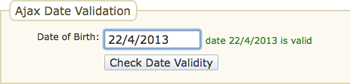
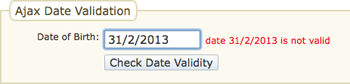
Other actions could also be taken such as disabling form submission until there is a valid date.
The relevant portions of the HTML are as follows:
<script src="/scripts/AjaxRequestXML.js"></script>
<script>

  function callAjax(value, target)
  {
    if(encodeURIComponent) {
      var params = {
        "value" : value,
        "target" : target
      };
      return (new AjaxRequestXML()).post("/scripts/valid-date.xml", params);
    }
    return false;
  }

</script>

...

<form ...>

...

<p>Date of Birth: <input id="field_dob" name="dob" onchange="
  if(this.value.match(/^(\d{1,2})\/(\d{1,2})\/(\d{4})$/)) {
    callAjax(this.value, this.id);
  }
"> <small id="rsp_field_dob"><!-- --></small></p>

...

</form>
The JavaScript onchange event handler simply passes the date input value to a server-side script valid-date.xml.php where it will be tested. It then waits for an XML response containing instructions as to what message to display.
The PHP script valid-date.xml.php simply breaks up the date input string and passes the values to the built-in checkdate() function - which presumably knows all about leap years and other strange features of the Gregorian calendar:
<?PHP
  include "Chirp/ajaxresponsexml.php";

  if($_POST) {
    $target = trim($_POST['target']);
    $value = trim($_POST['value']);
  } else {
    die("Error: missing POST values");
  }

  $date_is_valid = false;
  if(preg_match("@(\d{1,2})/(\d{1,2})/(\d{4})@", $value, $regs)) {
    list($tmp, $day, $month, $year) = $regs;
    $date_is_valid = checkdate($month, $day, $year);
  }

  $retval = $date_is_valid ? "date $value is valid" : "date $value is not valid";

  $xml = new \Chirp\AjaxResponseXML();
  $xml->start();

  $xml->command('setcontent', [
    'target' => "rsp_$target",
    'content' => $retval
  ]);
  if($date_is_valid) {
    $xml->command('setstyle', [
      'target' => "rsp_$target",
      'property' => 'color',
      'value' => 'green'
    ] );
  } else {
    $xml->command('setstyle', [
      'target' => "rsp_$target",
      'property' => 'color',
      'value' => 'red'
    ]);
    $xml->command('focus', [
      'target' => $target
    ]);
  }
  $xml->command('setstyle', [
    'target' => "form1",
    'property' => 'cursor',
    'value' => 'default'
  ]);

  $xml->end();
You can copy the code for valid-date.xml.php from the box below:
The script ajaxresponsexml.php can be copied below:
Both files need to be saved in the same folder as your HTML page for the date validation to work - so you have four files in total - the original HTML file with the form, AjaxRequestXML.js, ajaxresponsexml.php and valid-date.xml.php.
Similar to this setup from another example:
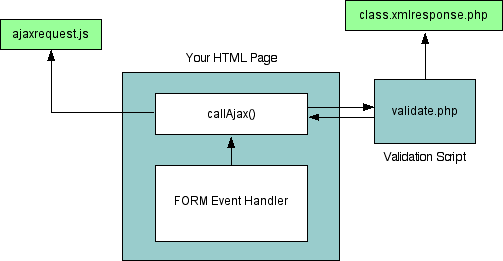
With Ajax you can make use of more powerful server-side functions and don't have to include large JavaScript libraries for validating dates and other values. Just be aware that it means more requests to the server which can be slower than downloading and running JavaScript code.
The AjaxRequest class is a simple one we've created and use on a number of projects. You can find the details in Web Services using XMLHttpRequest (Ajax) and related articles.
References
Related Articles - Form Validation
- HTML HTML5 Form Validation Examples
- HTML Validating a checkbox with HTML5
- JavaScript Password Validation using regular expressions and HTML5
- JavaScript Preventing Double Form Submission
- JavaScript Form Validation
- JavaScript Date and Time
- JavaScript Allowing the user to toggle password INPUT visibility
- JavaScript Counting words in a text area
- JavaScript Credit Card numbers
- JavaScript A simple modal feedback form with no plugins
- JavaScript Tweaking the HTML5 Color Input
- PHP Basic Form Handling in PHP
- PHP Protecting forms using a CAPTCHA
- PHP Creating a CAPTCHA with no Cookies
- PHP Measuring password strength
Leo 19 December, 2016
Contributing for function on item 3, in case you need to check if the date given is bigger than today, you can include the code below:
var today = new Date();var fullDate = [today.getDate()+"/"+(today.getMonth()+1)+"/"+today.getFullYear()];
if(field.value > fullDate){
errorMsg = "Date is bigger than today.";
}
Cheers!
Jomaira 13 October, 2016
What if my date of birth validator has 3 fields. Yyyy Mn dd.
They all have their own validator but i need a validator that validates the combined input of the three fields without jquery
Max 20 October, 2012
I found a small bug in your checkTime() function.
It doesn't allow a space after minutes and before the am/pm
example: "03:30 am" will get an invalid time.
while "03:30am" will be ok.
I modified the reg to the following:
re = /^(\d{1,2}): (\d{2})(:00)?$?([ap]m)?$/;
Thanks,
pradeep 17 September, 2011
Thanks for the code... It helped me a lot.... I had many date fields in my form.... This helped me a lot.... I just modified the code to my need... that was a small thing.... Thanks for the code again.....
Ted Schumacher 28 June, 2007
There is no explanation of the string ([ap]m). I have done google searches but cannot find an explanation. Can you help?
It's a regular expression "([ap]m)?" that captures an (optional) 'am' or 'pm' at the end of the input:
Sumaira Butt 12 February, 2007
your date script is allowing invalid dates like 29/2/2007 29 feb doesnt exist. kindly do validate the end dates of months. and leap years.
It was made clear in the article that that level of checking is not included. I suggest using a server-side script such as the PHP checkdate function which can be called using Ajax or other means.